
Best Ways to Use Facebook to Drive Traffic to Your Blog & Website
Driving Facebook traffic to your blog and website is essential. Regardless of the quality of articles you write, without readers, your efforts as a marketer fail.
Facebook traffic provides incredible opportunities to increase your blog article readership.
Here are 12 actionable, effective, creative methods on Facebook to drive traffic to your blog and website.
1. Make Your Images Big
Facebook posts that include images get around 120% more engagement than posts with no photos. Make your images prominent, and you’re going to get lots more Facebook likes, shares, comments - and click throughs.
Use full sized images in some of your Facebook blog post updates. Check your Facebook Insights, and your blog site metrics to assess your successes with full sized images (and any of the methods in this article). Use the best methods to keep generating the most blog traffic for you.
To create a full sized image Facebook post, upload the image directly.

Link to your blog post in your text update. Use a shortened link such as a bit.ly to keep your post text looking cleaner.
Example:
Here’s a great example of a full sized blog post image from HubSpot.
The image is cute, relatable, and generally follows the rule of thirds to make it visually appealing.

Tips for Making your Images Big:
- Upload a visually appealing, related image to increase click throughs to your blog.
- Check your Facebook and blog site metrics to analyze the success of your full sized images. Repeat the types of posts that work best for you.
- Use a shortened link in your full sized image posts, to keep your text cleaner.
2. Make your Updates Short
Yes, you’re driving Facebook traffic to your blog article, and your blog article will have lots of text. On Facebook, though, short, witty updates generate the most engagement, and click throughs. Ideally, keep your update one sentence, and under the 140 Twitter character count.
Remember that lots of your Fans are using Facebook on mobile, too. Keep this in mind when you’re creating your text. Make your blog updates a short, clear and intriguing teaser for your blog article.
Example:
Here’s a great example of a short, teaser update from the Huffington Post.
The Facebook update gives you a good idea of what the blog article is about. It’s funny, enticing, and short. The article headline in the link “11 Commonly Used Made-Up Words That Drive Us Insane” further tells the gist of the article.

Tips for Making Short Facebook Updates:
- Follow the rule of thumb to keep your Facebook updates under 140 characters. This will force you to condense your text.
- Make your update a teaser of your blog. Write out 4 or 5 short one-sentence summaries of your article, and choose the most intriguing to post on Facebook.
- Keep your mobile readers in mind.
3. Ask Questions
Questions naturally invoke a response, don’t they?
Use questions to generate click through actions from your Fans. Make your questions witty, short and intriguing. Keep your readership in mind, and always keep your question related back to your blog article.
There are many types of questions you can ask, from fill-in-the-blank, trivia, personal views, etc.
Example:
The Next Webuses a short, intriguing question for its readership.
The question “What will happen to the Like button?”, coupled with Mark Zuckerberg’s photo clearly summarizes the gist of the blog article. It leaves Fans wanting to learn more by asking them for their knowledge or views on what’s going to happen. Making a question for the update generates more curiosity than if the update was just the title of the blog, for example.

Tips for Asking Questions:
- Keep your questions short, easy to read, and relatable to your Fan Page. Use the word “you”, for example.
- Questions naturally invoke a response. Use succinct, curiosity-invoking questions to get clicking through, sharing, Liking or commenting actions.
- Mix up your question types, from opinion getting, trivia (from your article), or even problem solving.
4. Use a Short Quote From Your Blog
Give your Fans a taste of your blog post. Include an intriguing quote from your article. Quotes in general are some of the most shared content on Facebook. If a Fan shares your update, they’re more likely to have clicked through to your site, too.
Find a quote in your article that’s concise and gives a flavour of its contents. You can even make it more personalized, by including a photo of the person or writer making the quote.
Example:
Mashableuses this tactic to personalize their article.
The quote they chose tells Fans who the article is about, by showcasing the interviewee, and what the article is about.

Tips for Using Quotes:
- Choose a quote from your blog article that clearly summarizes a main point.
- Use a quote that invokes controversy to generate more engagement on your Facebook Page, and get more clicks to your blog.
- Personalize your quote by including a face of the author or interviewee.
5. Skip the Link
There’s no need to keep the link in the text of your post (unless you are posting a full sized image).
Make your update clean. Delete the link in your text before you post it. The image and summary of your article is clickable directly to your blog article.
Example:
Here’s what I mean:
Make your Facebook Status update, with the link to your blog article:

Delete the link:

Your update will have a clickable image, without the cluttered link:

Tips for Skipping the Link:
- Keep your Facebook update more readable, without the link.
- You only need the actual link if you are using a full sized image.
- Delete your article link before you post it to your Fans.
6. Share Lifestyle or How-To Blog Articles
Generally speaking, your Fans on Facebook don’t just want your product or service. They want you to enhance their life, and their sense of community on Facebook. Let’s face it, Facebook is a place where people go to catch up with their friends. As a business, you need to be posting tips to enrich the lives of your market too.
When you write a lifestyle or how-to blog article, share it on your Facebook Page.
Example
Whole Foodsuses the lifestyle strategy very successfully.
In this update, they share a link to their recipe blog. They use a full sized image in the post and link to the article with a shortened link. They use a friendly question in their text, and include the word “we”, to invoke that sense of community.

Tips for Sharing Lifestyle and How-To Articles:
- Use Lifestyle and How-To articles to share more than just your products or services with your Facebook Fans.
- Include questions - such as asking for your Fans for their tips - when you post the article links.
- Use pronouns like “you” and “us” to further create a sense of community.
7. Host Contests on Your Blog & Website
Generate Facebook traffic to your blog by publishing interactive content, like contests. Then promote your contest by posting it on your Facebook Page.
Your Fans want to engage with you, and many businesses cater to this by hosting Facebook contests. Switch up your marketing strategy to drive more views to website. Host contests on your blog, too. Make your contests more shareable to posting about it on Facebook.
Read tips on How to Run Successful Contests on Your Blog
Example:
Telus hosts contests directly on their website.
They promote them on their Facebook Page, to generate interest and shares with their Fans. This post shows the prize, and includes a shortened link back to the contest page.

Tips for Sharing Contests on Your Blog:
- Use interactive content on your blog to drive traffic from Facebook to it.
- Promote your blog contests on your Facebook Page to generate click throughs, and more shares.
- Use images of your contest prize when you post it on Facebook.
8. Make a ‘Weekly Wrap Up’:
Every Friday, make a blog post compiling your best articles of the week. Share it on Facebook. This gives your Fans a chance to see your blog articles at a glance. It’s also a great way to get more click throughs, as you’re offering your Fans article options.
When you post a “Weekly Wrap Up”, make a lookbook of your article images. This creates a very pretty and enticing update to your Facebook Fans.
Example:
Williams Sonoma uses the blog article compilation tactic.
They post the article on Friday, which likely supports an increase in weekend shopping. They use a lookbook to show all their gorgeous images from their blog articles.

Tips for Making a “Weekly Wrap-Up”:
- Generate more click throughs to your blog from Facebook by compiling a list of your articles from the week.
- Post the “weekly wrap-up” on a day that works best for your business sales.
- Use a lookbook to show all the images from your blog articles.
9. Embed Short Blog Video
Get creative with your blog images. Make a short Vine or Instagram video to show your readers the essence of your blog article. Then embed the video on your Facebook Page.
By embedding the video, your Fans can get a taste of what your article is about without leaving the site. If your video is enticing enough, your Fans will engage with your post, and click through to your blog article.
Example:
At Wishpond, we’ve used this tactic to link to articles.
The videos we’ve made are 6 second Vine videos, and they show a summary of the article. In this post, the video shows the title of the article, the topic, and three methods to market your Facebook contest (email, social media and Facebook ads).

Tips for Embedding Short Blog Video:
- Make a short video that shows what your article is about.
- Embed the video directly on to your Facebook post, to entice your Fans to interact with it.
- Include faces, or products to make it more personalized and cool.
10. Share Other People’s Blog Content
While it may seem counterintuitive, sharing other people’s content is actually a brilliant strategy in driving more traffic from Facebook to your blog and website.
Social media is all about sharing. So, share blog content from industry leaders, your Fans, and other reputable sources. Use articles that are relevant to your market, and that relate to your business too.
This strategy makes your business look more willing to share (and thus gain reciprocal Fan shares), your customers will appreciate your informative content (which can gain customer loyalty), and the businesses you’ve shared will be more likely to share your content to their Fans too (which can bring new Facebook traffic to your blog).
Example:
Facebook Marketing often posts blog articles from other sources.
They do this to provide quality information to their Fans. This example is from a blog article I wrote, that was posted on Business 2 Community. The topic relates to how small business can use Facebook.

Tips on Sharing Other People’s Content:
- Share other people’s content when it is from a trustworthy source, and the article benefits your consumer.
- Include the link to their Facebook Page - when the article is from another business.
- Generate potential sharing opportunities by extending your network with industry leaders and Fans.
11. Include a Blog Tab to Drive Facebook Traffic
A Blog tab on your Facebook Page is another valuable - and fairly simple - way to share and get people clicking through to your blog site.
I’d say the easiest way to add a Blog Facebook tab is to use an app, such as NetworkedBlogs. The site walks you through how to register your blog, and their basic plan includes a Facebook tab. Or if you’ve got developers handy, you can make your own tab in iFrame.
Once you’ve added a tab, your articles are automatically streamed to your tab page, so your Fans can click to view them.
WARNING: DO NOT just syndicate your blog articles to Facebook and Twitter. Go through the process to build a tab. Syndicating your articles will not get you the click throughs that the above mentioned tactics will.
Example:
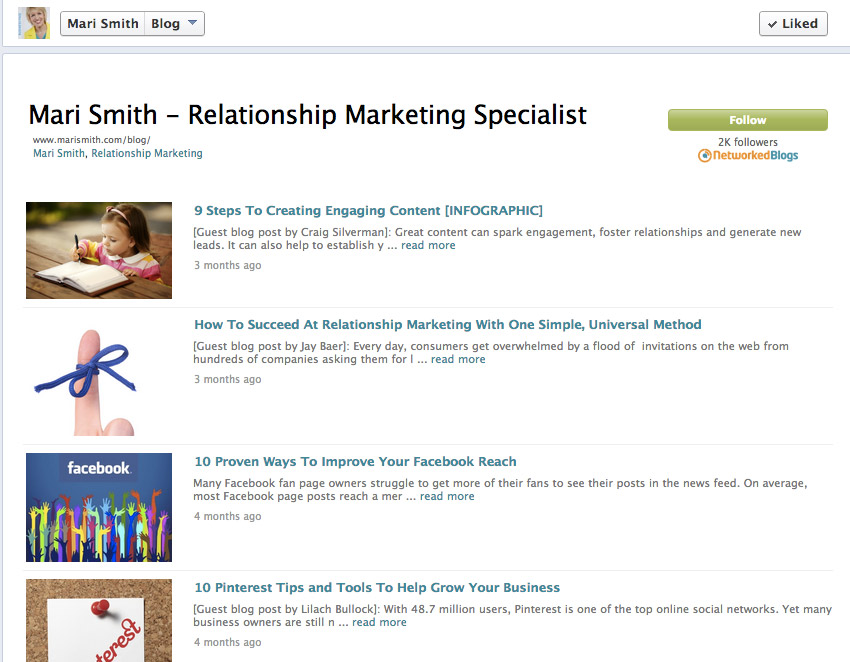
Mari Smith, a leading social media influencer, uses this tactic brilliantly.
She has a Facebook tab for her blog.

When one of her many Fans clicks on her Blog tab, they see her Blog landing page, which streams her blog articles. The articles link directly back to her blog site.
Tips on Including a Blog Tab:
- Share your blog articles through a tab on Facebook.
- Use an app, such as NetworkedBlogs to simplify your tab developement.
- Don’t syndicate your blog articles to your Page updates.
12. Use Facebook Ads
Facebook ads boost your reach to Fans and targeted audiences. Use them to get your blog updates seen, and drive Facebook traffic directly to your blog and website.
You can use what Facebook used to call promoted posts to target your blog updates to Fans and their friends. You can use more targeted Facebook ads to reach Facebookers with your niche demographics and interests.
Ads on Facebook don’t have to be expensive for the ROI you get. You can choose the pay-per-click option, so you only pay when someone clicks through to your site. Target your ads to reach your specific, interested people on a very granular level. Your ads are going to get clicked by your exact niche. (Yeah, very cool, right?)
Use best practices for your ad image, A/B test your text and targets, and link directly to your blog or blog post.
And hey, if Facebook ads seem a bit confusing check out how easy we make them for you: Facebook ads tool.
Example:
Here’s and example of a Facebook ad from TD Bank. They use targeted ads to drive Facebook traffic back to their blog site.

Tips for Using Facebook Ads:
- Use targeted Facebook ads to drive traffic from Facebook to your blog and website.
- Facebook ads enable you to reach extremely specific, interested markets.
- If you’re confused with the intricacies of developing a great Facebook ad campaign, use a Facebook ad tool.
